The Cursor for stories
Cursor is a tool programmers use to write code with AI. AI BunCho is the same idea for storytellers: write your story with AI, then turn it into comics, videos, songs and games.
ALL-IN-ONE MULTIMODAL AI STORY STUDIO
《킬러는 결말을 모른다》(16컷 시네마스코프 영화)와 《마지막 마법사는 잠들지 못한다》(90초 보컬 애니 OP)를 만든 바로 그 프로덕션 파이프라인을 무료로 시작하세요.
Start the 7-day free trial See how it works
Paying for several AI tools? See how much you'd save →
Good to know: The studio's interface is available in English, Español, Português and 繁體中文 (choose it in Settings), and plans are billed in US dollars. The account sign-up and login pages are still in Japanese.
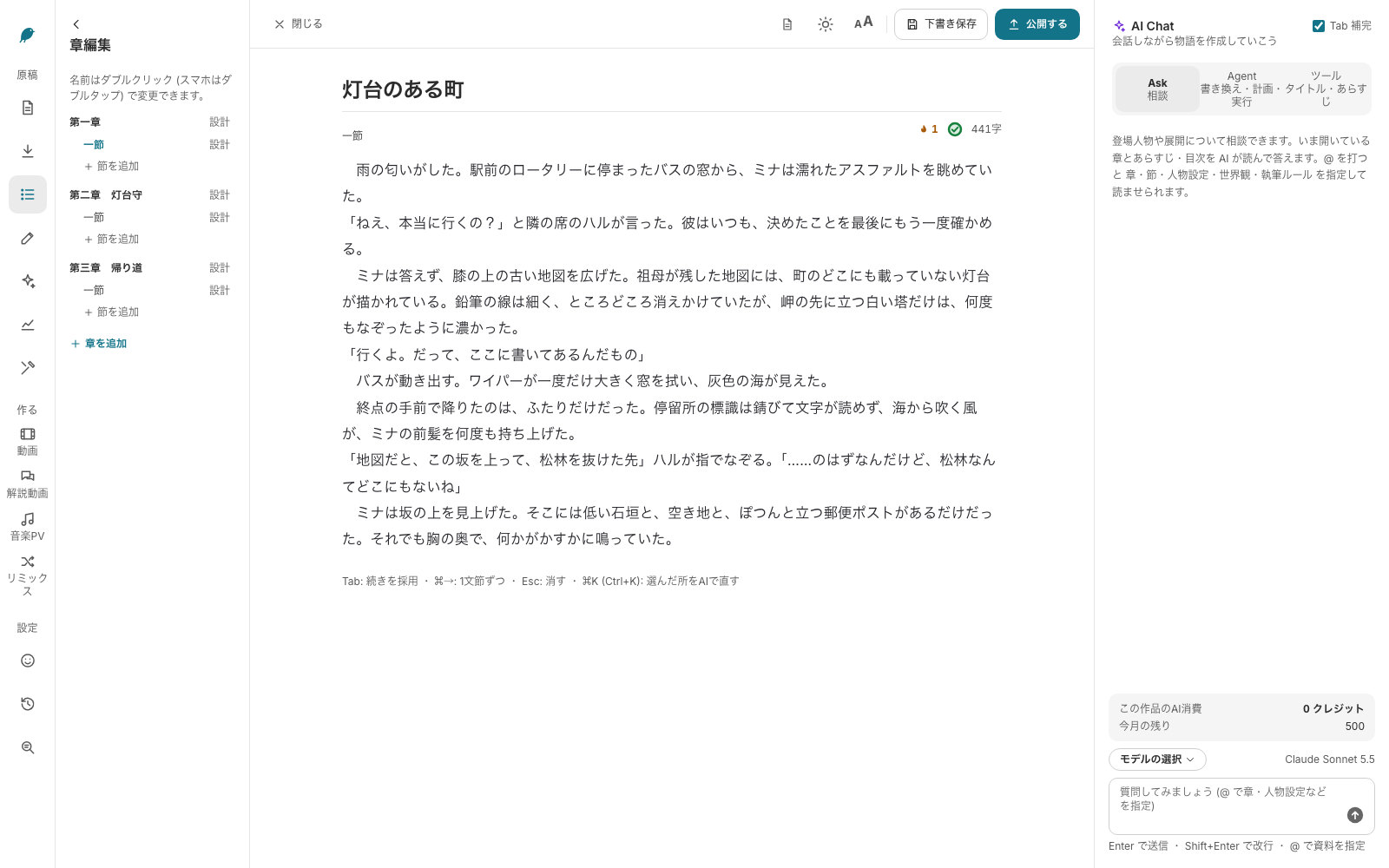
Follow these steps in order and you'll be writing within minutes. Any change the AI proposes stays out of your manuscript until you press apply.
Give your project a title. Works in progress and finished works are kept on separate tabs.
Build the outline in the chapter panel and write in the center. Splitting a long novel into sections keeps every scene easy to find and revise.
Switch the chat to brainstorm mode to talk through plot holes, character motives or what happens next. Point it at a chapter, a character sheet or your world notes with @-mentions.
Select a passage and say what you want — more atmosphere, more dialogue, third person, tighter pacing. Deletions and additions are highlighted; apply or discard.
Ask the agent for a sweeping change, such as making one character speak formally across chapters 2–4. It shows a plan and a cost estimate first, then a per-section diff you can accept piece by piece. A checkpoint lets you undo the whole run.
Cursor is a tool programmers use to write code with AI. AI BunCho is the same idea for storytellers: write your story with AI, then turn it into comics, videos, songs and games.
Discuss ideas in brainstorm mode; edit prose in rewrite mode, always with a before/after diff.
Each accepted change saves a version. Roll back a single edit or restore the whole work to the moment before an agent run.
Pick from current models such as GPT-6.1 Sol and GPT-6 Luna. Lighter models handle tab completion to save credits.
Tab completion suggests the next few sentences in faint text; inline edit (⌘K, or "Fix with AI" on phones) rewrites a selection in place; Ask, Plan and Agent modes handle bigger revisions.
Set point of view, style, banned words and how each character talks. Every AI request follows them.
Generate title and synopsis candidates from your manuscript, then export in a format that pastes cleanly into Shōsetsuka ni Narō and Kakuyomu.
It runs in the browser, so there is nothing to install. Draft a section on the train and polish it on your laptop.
Turn a chapter into a four-panel comic, page manga or webtoon; build a storyboard and animate the cuts; write lyrics and make a song or music video. Add, reorder and edit dialogue on each storyboard card, fix a cut by describing the change, and swap faces, lyrics or voices in a finished video.
Make key visuals, posters and promos from your story, or ad campaigns for a product: three plan options with the reasons behind each technique, a design editor with 69 media sizes (Meta, Google, TikTok, LINE, X, print with 300 dpi bleed and trim marks), brand kits, bulk variations, preflight checks (legal wording checks are hints, not legal advice), a comment-only review link for clients and ZIP delivery.
| Free BunCho tools | Studio | |
|---|---|---|
| Price | Free, as always | Included in paid plans (7-day free trial for first-timers) |
| What it does | Title generator, synopsis generator, AI relay novel | Long-form drafting, brainstorming, rewriting, multi-chapter revision, export |
| Workspace | One screen per tool | Chapter tree + manuscript + AI chat on one screen |
| AI models | BunCho's own Japanese model | Current models such as GPT-6.1 Sol and GPT-6 Luna |
| Editing | Pick from generated options | Free-form instructions, review the diff, then apply |
| History | — | Version history, restore and checkpoints |
Four plans include Studio. First-time subscribers get 7 days free with 500 trial credits and 1 video (up to 30 s).
US$9.99/month
JPY plans are also available from ¥1,500/month before tax; credits vary by billing currency.
Best for ongoing novels
US$19.99/month
JPY plans are also available from ¥3,000/month before tax; credits vary by billing currency.
US$34.99/month
JPY plans are also available from ¥5,000/month before tax; credits vary by billing currency.
US$199.99/month
JPY plans are also available from ¥30,000/month before tax; credits vary by billing currency.
Unused monthly credits roll over for up to 3 months, up to 2× your monthly amount (older credits are used first; trial credits don't roll over). Credits are an estimate: how fast they go depends on the length of your work and the model you choose. If you run out, you can opt in to capped pay-as-you-go or buy a prepaid credit pack. Nothing extra is charged without your consent. Cancel anytime from the studio settings; cancel during the trial and you pay nothing. Credit packs can also be paid with Alipay or WeChat Pay (charged in JPY) when the studio is set to Japanese or Traditional Chinese. On Feast, Full Course and Team, images, songs, voices and LTX video made on our own GPUs use 0 credits (fair use: e.g. 300 images, 120 s of video and 30 songs a day; hosted models still use credits, and nothing switches to paid automatically). AI video now costs 6.6 credits per second on our own GPUs, 13.2 for hosted economy and 26.4 for standard.
Outline, brainstorm, rewrite and export — all on one screen.