Write in ChatGPT or Claude. Finish in BunCho.
Connect BunCho to the ChatGPT or Claude you already use, and from the chat you can hand a manuscript to BunCho for a contradiction check, a story bible, a 4-panel comic, manga or video. Fine-tuning and publishing happen in BunCho.
https://bun-cho.work/mcp
BunCho is not affiliated with or endorsed by OpenAI or Anthropic. ChatGPT is a trademark of OpenAI and Claude is a trademark of Anthropic; the names are used only to say which services BunCho works with.
Three steps
Write or paste in the chat
Paste a manuscript you wrote with ChatGPT or Claude, or one you already have.
BunCho reads and makes
Ask "check this for contradictions" or "make it a 4-panel comic". BunCho gives you a quote and runs only after you say OK. Results appear in the chat.
Finish in BunCho
"Continue in BunCho" opens BunCho Studio, where you can fix panels, run Story Tests, make music videos and publish.
What you can do from the chat
Some things finish inside the chat; others you finish in BunCho Studio. All of it runs on your BunCho account.
Import a manuscript and check contradictions
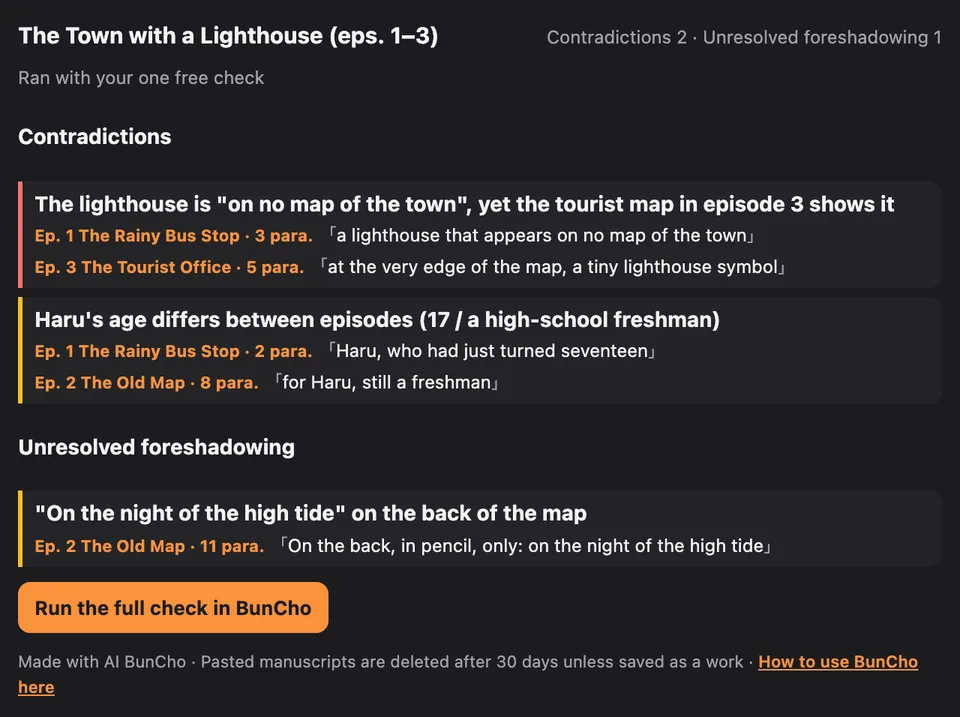
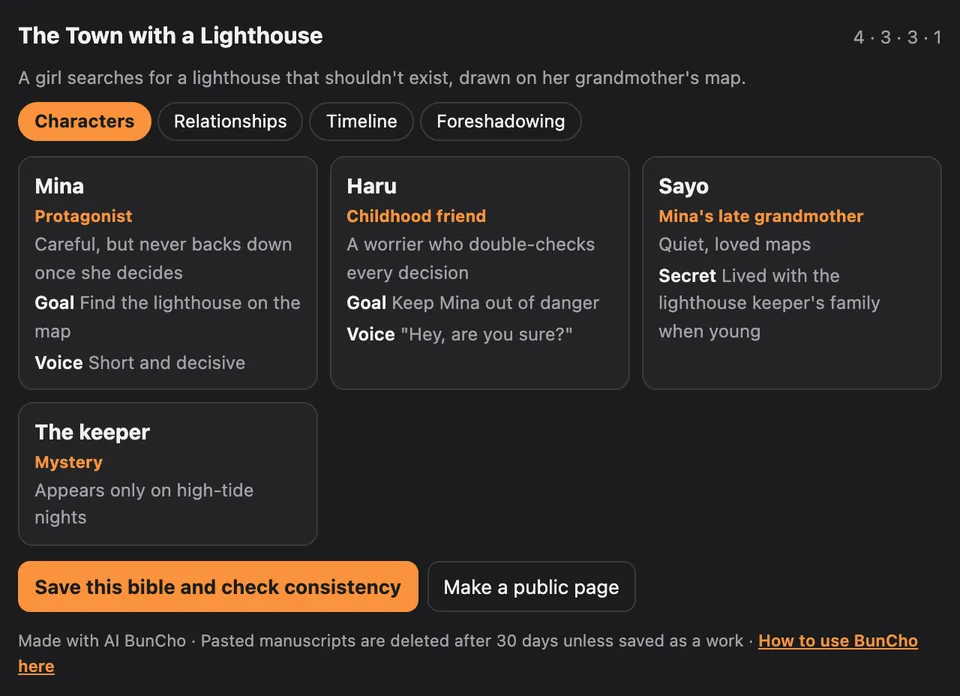
Reads a pasted manuscript (up to 50,000 characters) and points out contradictions and foreshadowing that's never paid off, with episode, paragraph and the exact quote. It can also build a story bible: characters, relationship map, timeline, foreshadowing. The contradiction check is free once per account.
check_story · story_bible
Save it and run Story Tests
"Save it and check consistency" turns it into a BunCho work with one chapter per episode plus the story bible (free). Continue with Story Tests (foreshadowing, voice and contradiction checks) in BunCho. A list of scenes affected by a change ("what if the brother were a sister?") is free too.
save_story_bible · story_impact
4-panel comics, manga, Webtoon
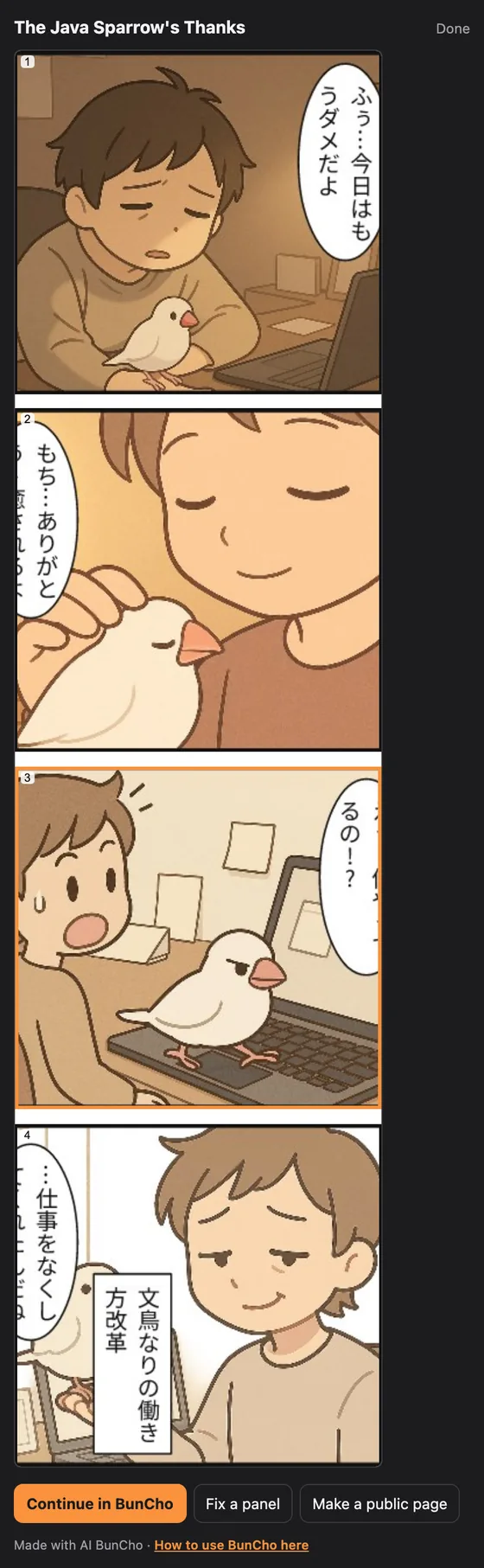
Makes a 4-panel comic, manga pages or a vertical Webtoon from text or a chapter. In apps that support it, the finished pages show up right in the chat.
make_manga
Redraw one panel, animate a panel
Redraw a single panel ("make the hero smile in panel 3 on page 2"), or turn a panel into a few seconds of video with the same characters.
edit_panel · animate_panel
Video and explainer video
Makes a storyboard video or an explainer video (script → voices → export) from a chapter or script.
make_video
Songs and music videos
Music videos made from a song are made in the Video tab of BunCho Studio. From the chat, BunCho can only link you there.
BunCho Studio
Publish
Publish finished manga or video to the BunCho reader site, or make a "Made with AI BunCho" public page. Both only when you explicitly ask in the chat.
publish · create_share_page
BunCho's screens
Things you can say
Copy one and paste it into a chat with BunCho turned on. You don't need to know any tool names.
- In the chat
Import this manuscript into BunCho and check it for contradictions
Quote → OK → contradictions and unresolved foreshadowing with episode, paragraph and quote. Free once per account.
- In the chat
Make a story bible for this: characters, relationships, timeline, foreshadowing
Story bible cards. Uses a few credits (you get the quote first).
- Chat → BunCho
Save it and check consistency
Saved as a BunCho work (free). Continue with Story Tests in BunCho.
- In the chat
Turn episode 3 into a 4-panel comic
From a chapter of a work saved in BunCho. The comic appears in the chat.
- In the chat
Redraw panel 3 on page 2 so the hero is smiling
Redraws just one panel. You get a quote first.
- In the chat
Turn panel 1 into a 5-second video
A short clip with the same characters.
- In BunCho
Make a music video for this song
Music videos from a song are made in the Video tab of BunCho Studio; the chat takes you as far as opening BunCho.
- In the chat
Publish it
If you allowed publishing, it confirms and then publishes to the BunCho reader site.
How credits work
Everything is paid with the credits on your BunCho account. That's separate from what you pay for ChatGPT or Claude, and they won't bill you anything extra for BunCho.
Always a quote first
Before making manga, video or a story bible, it tells you in the chat how many credits it will use. Nothing is spent until you say OK.
What's free
Creating a work, saving to BunCho, listing affected scenes and making a public page are free. The contradiction check is free once per account, and analyzing the same manuscript a second time doesn't charge for reading it again.
Free credits on your first connection
Free credits for about 3 manga pages (first connection only, no card, once per account, for people who haven't had a trial).
When you run out
The chat shows a link to plans. BunCho never retries on its own and spends more. Plans and extra credits are in BunCho Studio.
Privacy and safety
The connector can only touch your BunCho account, and only within what you allowed on the consent screen.
What BunCho sees
Only what ChatGPT or Claude passes to BunCho's tools (the manuscript or instruction you asked about). BunCho doesn't receive your other conversations or your ChatGPT / Claude account details.
You sign in on BunCho's page
Signing in with Google, LINE or email happens on bun-cho.work. Your BunCho password is never given to ChatGPT or Claude.
Pasted manuscripts are deleted after 30 days
Manuscripts (drafts) pasted from a chat are deleted automatically after 30 days unless you save them as a work.
Nothing is published without you
Publishing happens only when you explicitly ask in the chat, and you can decline the publish permission.
Disconnect any time
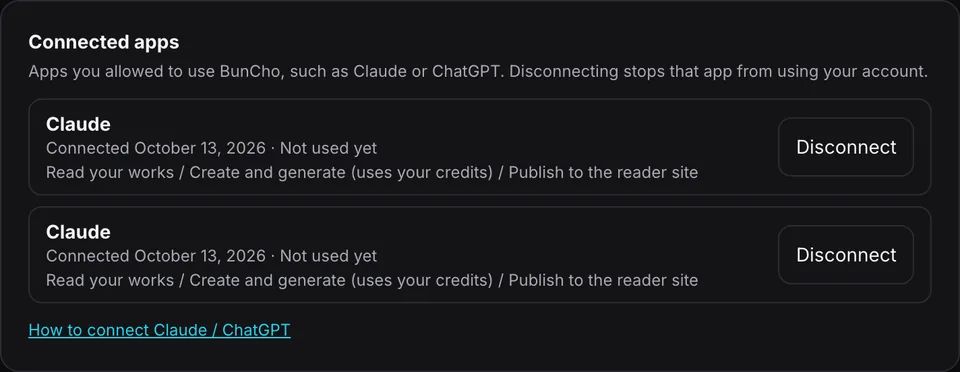
BunCho Studio Settings → "Connected apps" disconnects it at any time. You can also remove it in ChatGPT or Claude.
What you allow (consent screen)
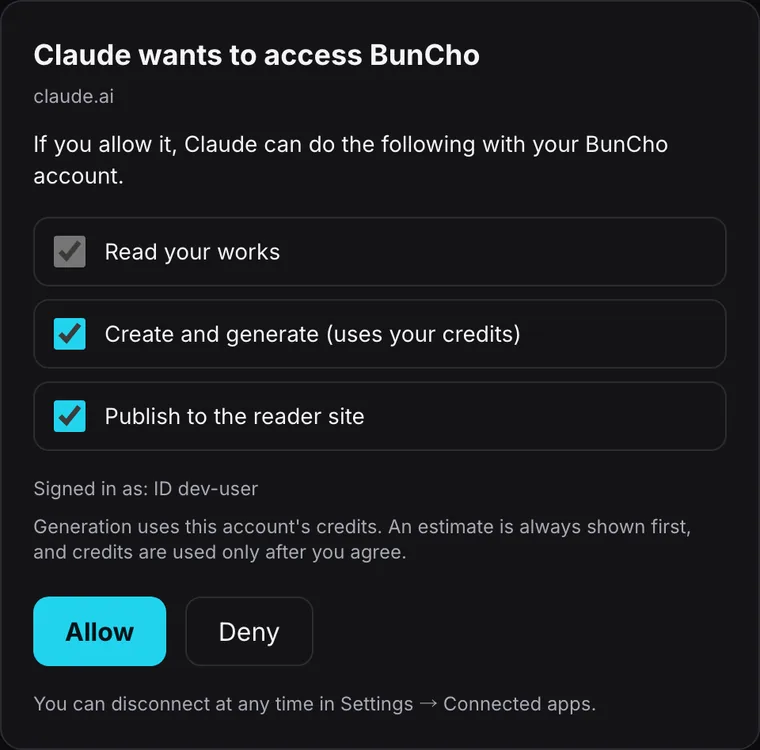
After you sign in to BunCho, the consent screen lists what the assistant may do (only what ChatGPT or Claude asked for is shown). Everything except "Read your works" can be unchecked.
works:readRead your works
Lists your works and reads their contents (chapters, text). Required.
works:writeCreate and generate (uses your credits)
Creates works and generates manga, video, story bibles and so on. This is the only permission that uses credits, always after a quote.
works:publishPublish to the reader site
Publishes a work to the BunCho reader site, only when you explicitly ask in the chat. You can leave it unchecked.
You can disconnect at any time: BunCho Studio Settings → "Connected apps".
Open connected appsWhich one?
Claude
Add it as a custom connector on any plan, including Free (Free allows one custom connector). Add it once on the web and it also works in the desktop and mobile apps.
ChatGPT
BunCho isn't in ChatGPT's official directory yet, so you add it as a "custom MCP server" in developer mode. Making and publishing need a plan with write actions (Business, Enterprise, Edu).
FAQ
Is this an official ChatGPT or Claude feature?
No. ChatGPT and Claude let you connect outside services through MCP, and BunCho supports that on its own. BunCho isn't affiliated with OpenAI or Anthropic.
Who do I pay?
Generation in BunCho uses your BunCho account's credits. Your ChatGPT or Claude plan is paid to them and is separate from BunCho.
Do I need a BunCho account first?
The BunCho sign-in page opens while you connect, and you can create an account there with Google, LINE or email. Without a plan, you can try it with the free credits for your first connection.
Does it work on my phone?
Claude: add it once on the web and it works in the mobile app on the same account. ChatGPT: use it where developer-mode apps are available (such as the web).
Does it work in other languages?
Yes. It replies in the language of the chat, and the in-chat views come in English, Japanese, Spanish, Portuguese and Chinese (Traditional and Simplified).
What can't I do from the chat?
Music videos, detailed panel layout and speech-balloon editing, and detailed export settings happen in BunCho Studio. "Continue in BunCho" on a result opens the same work.