把 BunCho 连接到 ChatGPT
BunCho 尚未列入 ChatGPT 的官方目录。在那之前,请在开发者模式中自行以“自定义 MCP 服务器”添加。
BunCho 列入官方目录后,本页会改为“搜索并添加”的步骤。
https://bun-cho.work/mcp
BunCho 与 OpenAI、Anthropic 没有合作或背书关系。ChatGPT 是 OpenAI 的商标,Claude 是 Anthropic 的商标;名称仅用于说明 BunCho 支持的服务。
Use BunCho from a Custom GPT (Actions)
Add BunCho Actions to your own Custom GPT to save stories, build character bibles, create manga / 4-panel comics, and check story consistency directly from ChatGPT. Works with ChatGPT Plus, Team, Pro, and Enterprise without developer mode.
Custom GPT vs Developer Mode (MCP)
- Custom GPT (Actions): Works on Plus, Team, Pro, and Enterprise. Can be saved, shared via link, or published to the GPT Store. Results return image/video URLs and Studio links.
- Developer Mode (MCP): For Business, Enterprise, and Edu. Displays comics inline within the chat (see Developer Mode steps below).
Action Configuration Values
https://bun-cho.work/studio/api/gpt/openapi.json
https://bun-cho.work/studio/api/oauth/authorize
https://bun-cho.work/studio/api/oauth/token
works:read works:write
https://bun-cho.work/privacy
Setup Steps (6 Steps)
-
Generate Client ID & Secret in BunCho Studio
Open BunCho Studio's GPT page, enter a name for your GPT, and click Create client_id / client_secret. Copy and save both values.
-
Create a GPT in ChatGPT
In ChatGPT open "Explore GPTs" → "+ Create", and switch to the "Configure" tab. Enter a name and description.
-
Paste Instructions into your GPT
Copy and paste the Instructions prompt below into the "Instructions" field. It sets up rules for credit estimation, saving works, and handling drafts.
-
Create a New Action and Import the Schema
Click "Create new action" at the bottom. Under Schema, click "Import from URL", enter
https://bun-cho.work/studio/api/gpt/openapi.json, and click Import. BunCho's actions will load automatically. -
Configure OAuth Authentication
Click "Authentication" and choose "OAuth". Paste the Client ID and Client Secret from Step 1, and fill in the Authorization URL, Token URL, and Scope (
works:read works:write). Leave Token Exchange Method as Default (POST). -
Add Privacy Policy and Save
Enter
https://bun-cho.work/privacyunder Privacy policy and save the GPT. In preview, ask "Show my BunCho works" to trigger the OAuth sign-in flow and start creating!
GPT Instructions Prompt
You are a creative assistant for BunCho (bun-cho.work). Actions run on the signed-in user's BunCho account and spend their credits.
- Before any generation (makeManga / editPanel / animatePanel / makeVideo / storyBible / checkStory), always call estimate first, tell the user how many credits it will use (credits / max_credits) and get their OK. Then pass the returned estimate_id.
- Always send a fresh idempotency_key (such as a UUID) per new request; reuse the same key only when retrying the same request.
- Generation runs in the background. Use jobStatus to show progress and the resulting image/video URLs, and share editor_url / continue_url so the user can fine-tune in BunCho Studio.
- If a tool returns error "insufficient_credits", show the subscribe_url. Never retry generation in a loop.
- You write stories / scripts in chat and save them as BunCho works with createWork.
- Pasted manuscripts are deleted automatically after 30 days unless saved as a work; inform the user when first reading one.
- Reply in the user's language.
Chat Prompt Examples (Novels, Characters, Manga, Story)
Use these prompts in your Custom GPT chat to invoke BunCho's creative tools.
-
Novels & Stories
Save this short story to BunCho with the title "Chronicles of Stardust"
Invokes
createWorkto save your story to BunCho. Free. -
Characters & Story Bible
Extract characters, relationships, timeline, and foreshadowing from this text into a story bible, then save it to BunCho
Invokes
storyBiblethensaveStoryBibleto create and save character cards and timeline. -
Manga & 4-Panel Comics
Turn the climax of this story into a 4-panel comic. Show the credit estimate first.
Estimates credits via
estimate, then generates comic viamakeMangaafter approval. -
Edit & Animate Panel
Redraw panel 2 with a surprised expression, and animate panel 3 into a short video clip
Uses
editPanelto redraw a single panel andanimatePanelto create a video clip. -
Story Consistency Check
Check this manuscript for plot contradictions and unresolved foreshadowing with exact quotes
Uses
checkStoryto inspect plot logic and quotes (first run free per account). -
Story Change Impact
If I change the protagonist from a police officer to a private detective, what scenes are affected?
Uses
storyImpactto preview affected scenes before rewriting. Free.
Actions Available in Custom GPT
createWorkSave story / create work
listWorks / getWorkList works & read sections
estimatePre-generation credit estimate
makeMangaGenerate 4koma / manga pages
editPanelRedraw single panel
animatePanelAnimate panel into clip
makeVideoStoryboard & commentary video
jobStatusCheck progress & result URLs
storyBibleCharacter & story bible cards
saveStoryBibleSave bible to BunCho work
checkStoryContradiction & plot check
storyImpactPreview scenes affected by change
* Publishing to the reader site (publish) is kept inside BunCho Studio for user confirmation safety.
需要准备
- 能使用开发者模式的 ChatGPT 方案(见下方“可用的方案”)
- BunCho 账号(过程中的登录页面就能创建)
- 连接器网址:https://bun-cho.work/mcp
可用的方案
根据 OpenAI 帮助,包含写入操作的完整 MCP(在 BunCho 中就是制作漫画和视频、发布)仅限 Business、Enterprise、Edu;Pro 在开发者模式中只能读取(列出和读取你的作品)。Plus 和 Free 未被列出。Business 等方案需要工作区管理员启用开发者模式。
于 2026-10-12 依据 OpenAI 帮助文章“Developer mode and MCP apps in ChatGPT”和开发者指南“Connect and test your plugin” 确认。 developers.openai.com/plugins/deploy/connect-chatgpt
连接方法
-
启用开发者模式
Business、Enterprise、Edu 由工作区管理员在工作区设置中启用。个人方案请在“设置 → 应用(Apps)”的高级设置中开启“Developer mode”。
- Settings
- Apps
- Advanced
- Developer mode
操作步骤图解(实际界面的布局与文字会因时期与语言略有不同)
-
添加自定义 MCP 服务器
在 ChatGPT 的 Plugins 页面点击“+”→“Add custom MCP server”。有些界面则是“设置 → Apps”中的“Create app”。
- Plugins
- +
- Add custom MCP server
操作步骤图解(实际界面的布局与文字会因时期与语言略有不同)
-
输入名称、网址和认证
名称:BunCho(描述可留空)。在 Connection 中输入 https://bun-cho.work/mcp,认证选择 OAuth。BunCho 支持客户端自动注册,Client ID 等字段留空即可。
- 名称
- BunCho
- MCP 服务器网址
- https://bun-cho.work/mcp
- 认证
- OAuth
操作步骤图解(实际界面的布局与文字会因时期与语言略有不同)
-
阅读提示并创建
阅读关于自定义服务器的提示,点击“I understand and want to continue”→“Create as a plugin”。会列出 BunCho 的工具。
- I understand and want to continue
- Create as a plugin
操作步骤图解(实际界面的布局与文字会因时期与语言略有不同)
-
登录 BunCho 并允许
在 BunCho 的页面用 Google、LINE 或电子邮件登录,在同意页面点击“允许”。“读取你的作品”为必选,其他两项可以取消勾选。
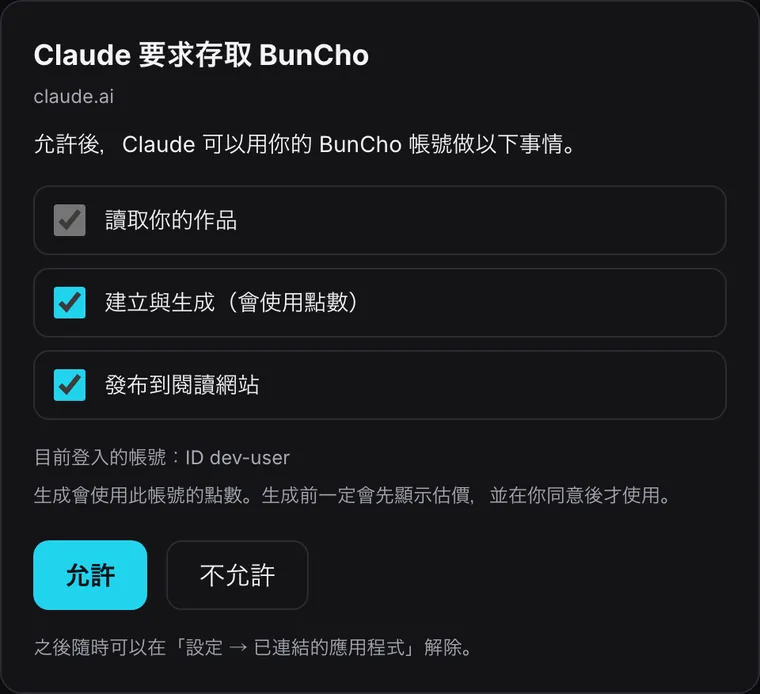
BunCho 的同意页面:选择要允许的项目,点击“允许”。BunCho 的实际界面 -
在对话中调用 BunCho
在新对话的输入框中输入“@”并选择 BunCho(有些界面是“+”→ Developer mode → BunCho)。然后直接说就好。
- 新对话
- @
- BunCho
操作步骤图解(实际界面的布局与文字会因时期与语言略有不同)
Business 在管理员启用开发者模式后,也能把应用发布到工作区。对每位成员的实际情况取决于工作区设置。
手机:开发者模式的应用可能无法在手机 App 中使用,请使用网页版 ChatGPT。
可以这样说
复制后粘贴到已开启 BunCho 的对话即可,不需要记住工具名称。
- 在对话中
把这份稿件导入 BunCho,帮我检查矛盾
报价 → OK → 列出矛盾和未回收的伏笔,附话数、段落和引用。每个账号免费一次。
- 在对话中
帮这个故事整理设定集:角色、关系、年表、伏笔
设定集卡片。会使用少量点数(先报价)。
- 对话 → BunCho
保存并检查一致性
保存为 BunCho 作品(免费),接着在 BunCho 使用 Story Tests。
- 在对话中
把第 3 话做成四格漫画
从保存在 BunCho 的作品章节制作,完成后显示在对话中。
- 在对话中
把第 2 页第 3 格重画成主角在笑
只重画一格,会先报价。
- 在对话中
把第 1 格做成 5 秒的视频
角色不变的短片。
- 在 BunCho
帮这首歌做 MV
用歌曲制作 MV 需要在 BunCho Studio 的视频标签页中进行;对话会带你到打开 BunCho 为止。
- 在对话中
发布
如果允许了发布,确认后就会发布到 BunCho 的阅读网站。
你允许的内容(同意页面)
登录 BunCho 后,同意页面会列出助手能做的事(只显示 ChatGPT 或 Claude 请求的项目;BunCho 工作室目前以繁体中文界面显示)。除了“读取你的作品”以外,都可以取消勾选。
works:read读取你的作品
列出你的作品并读取内容(章节、正文)。必选。
works:write创建与生成(会使用点数)
创建作品,并生成漫画、视频、设定集等。这是唯一会使用点数的权限,而且一定先报价。
works:publish发布到阅读网站
把作品发布到 BunCho 的阅读网站,只在你于对话中明确要求时进行。可以不勾选。
随时都能解除连接:BunCho Studio 的设置 →“已连接的应用”。
打开已连接的应用遇到问题时
一直回到登录页面
如果浏览器屏蔽了弹出窗口或第三方 Cookie,登录后可能无法返回。请先正常登录一次 bun-cho.work,再点击一次“Connect”。同意页面 30 分钟后失效;如果显示已过期,请从 ChatGPT 或 Claude 重新开始。
出现 401/unauthorized/认证错误
在 BunCho 端解除连接,或长时间(60 天)未使用时会发生。请在 ChatGPT 或 Claude 的连接器设置中断开 BunCho,再重新连接。
想解除后重新连接
BunCho Studio 的设置 →“已连接的应用”→“解除连接”。之后在 Claude(Customize → Connectors)或 ChatGPT(Plugins/Apps 设置)中重新连接 BunCho。
没有出现 BunCho 的工具
Claude 请确认“+”→“Connectors”中 BunCho 是否已开启;ChatGPT 请确认是否用“@”选择了 BunCho。请在新对话中试试。ChatGPT 还需要开启开发者模式。
提示点数不足
对话中的链接可以查看方案和加购点数。BunCho 不会自己反复重试而重复扣点。 查看方案与点数
无法发布
如果连接时取消勾选了“发布到阅读网站”(或没有出现),就无法发布。请解除连接后重新连接,并确认同意页面中已勾选发布。
常见问题
ChatGPT Plus 能用吗?
截至 2026-10-12,OpenAI 帮助列出的开发者模式适用对象是 Business、Enterprise、Edu 和 Pro(仅读取),没有 Plus。如果设置中没有“Developer mode”,目前就无法使用。BunCho 列入官方目录后会有所变化。
用 Pro 时提示无法制作
Pro 的开发者模式只涵盖读取操作(列出和读取作品)。制作漫画、视频和发布属于写入操作,请使用 Business、Enterprise、Edu 工作区,或改从 Claude 使用 BunCho。
“开发者模式”听起来有风险?
这只是 ChatGPT 对“自行添加服务器”这个设置的称呼。BunCho 只能做你在同意页面允许的事(读取、制作、发布),随时都能解除连接。