Checklist Before Selling AI-Assisted Work on KDP, YouTube and BOOTH
Once your work is finished, the next step is putting it out. But every platform has its own AI disclosure rules, and getting them wrong can lead to your work being taken down or to a terms violation. This guide covers what to check, in order, before you publish, and how to use BunCho's Sell & Publish to build a per-platform kit (files, draft listing text, AI disclosure answers, image sizes and a license). It reflects each platform's official pages as checked on October 12, 2026, and it is not legal advice.
First, keep a record of what you used AI for
A platform's AI disclosure answer depends on where and how much you used AI. If you try to remember afterwards, you tend to under-declare.
BunCho automatically keeps an AI usage record for each work. It shows how much of the text you wrote yourself, how much AI generated and how much AI rewrote, plus which tools you used (text, images, video, voice, music).
AI rules by platform (as of October 12, 2026)
Here is a short summary of the rules on the main platforms. Rules change, so always check the official pages before you publish.
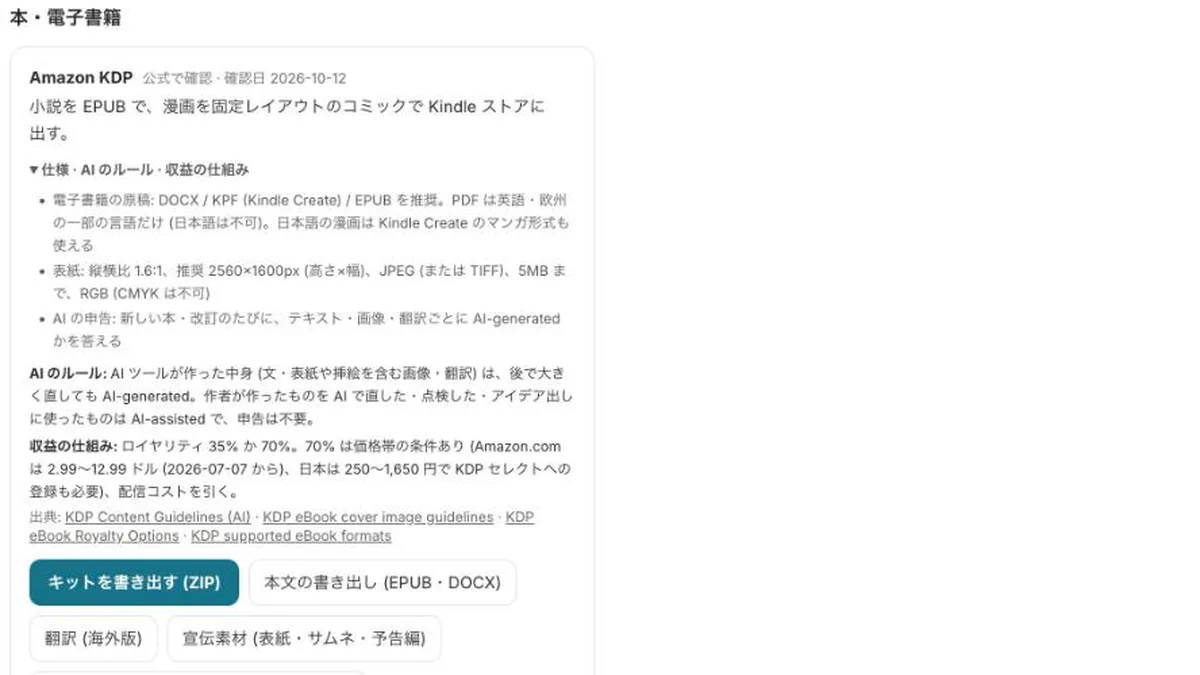
- Amazon KDP: AI-generated text, images and translations must be disclosed. Content that AI created counts as AI-generated even if you later edit it heavily. Content you created yourself and then refined with AI is AI-assisted and does not need to be disclosed.
- YouTube: if you used AI to create or alter realistic people, places or events, you must disclose it as altered or synthetic content. Animation and clearly fictional content do not need this.
- TikTok and Instagram: label realistic AI-generated video and audio.
- pixivFANBOX: AI-generated content cannot be posted. Fantia also has restrictions. Tapas and Bandcamp do not allow AI-generated content.
- DLsite: choose either "AI-generated work" or "partial AI use". itch.io: answer the generative AI disclosure field. Steam: describe how you used AI in the Content Survey.
- BOOTH: AI works that rely heavily on a specific work or creator, and mass listings, can lead to account suspension.
- Music distributors: policies differ by company; for example, TuneCore Japan does not accept songs that are 100% AI-generated.
How to build a kit with Sell & Publish
-
1Open your work and go to Sell & Publish
You can open it from the "…" menu on a work in the Studio, or from the "Export for publishing" screen. The screen for choosing a work is /studio/sell.
-
2Check the provenance
The top of the screen shows the breakdown of this work's AI usage record. Disclosure answers are filled in automatically from it.
-
3Export the kit for the platform you want
Each platform gets its own kit as a ZIP: for KDP, an EPUB, draft listing fields, AI disclosure answers and cover specs; for BOOTH, the files buyers receive, product page text and a buyer license; for YouTube, draft titles, descriptions, chapters and hashtags.
-
4Resize images to each platform's dimensions
You can make a 1600x2560 KDP cover, a full set of Steam capsule images, 3000x3000 music artwork, and vertical-scroll slices (800px wide) right in your browser (nothing is uploaded).
-
5Complete the checklist, then publish
For each platform, check five things: rights, provenance, AI disclosure, the platform's terms, and that the work is suitable for all ages. Rewrite the draft text in your own words before using it.
What each platform's kit includes
All kit text is a draft. Compare it with the platform's latest guidance and rewrite it in your own words before using it.
- Amazon KDP: EPUB (vertical text for Japanese), draft listing fields (description and keyword ideas), AI disclosure answers, and cover specs
- Serial and membership sites (Patreon, note, Substack, etc.): a suggested free / supporters-only split for each episode, plus teaser text
- BOOTH, Gumroad, DLsite, itch.io: EPUB, DOCX and TXT files for buyers, product page text, and a buyer license template
- Character asset packs: a commercial-use license template, product page text, and a list of asset dimensions
- YouTube, Shorts, TikTok, Reels: title ideas, description, chapters, hashtags, and guidance on AI labels
- Steam and itch.io (visual novels): store page text, the AI text for the Content Survey, and capsule image dimensions
- Vertical-scroll comics and music: a work synopsis and episode titles; release metadata and each distributor's AI policy
How to read "you can earn" numbers
The figures platforms publish are totals paid to all creators, or gross sales volume. For example, the artist ranked 100,000th on Spotify generated more than US$7,300 in royalties in 2025. Earnings are heavily concentrated among a small number of top creators.
These numbers show that a market exists; they are not what you will earn. Earnings depend on each platform's terms, review and how popular the work is.
See also: Figures and sources by platform (Earn with your work)
What not to do
- Hide your use of AI or under-declare it
- Sell work made to resemble existing works, a specific creator's style, or a real person's likeness or voice
- Publish on adult platforms (BunCho kits are for all-ages work only)
- Buy or sell in-game currency such as Robux outside the official systems
FAQ
Do I need to disclose text I rewrote with AI on KDP?
Under KDP's definitions, text you wrote yourself and then edited or checked with AI is AI-assisted and does not need to be disclosed. However, if the rewrite has replaced most of the text, choosing AI-generated is the safe option. BunCho's kit recommends the heavier category when the share of rewritten text is high.
Does exporting a kit use credits?
No. Kits, image resizing and the AI usage record do not call AI, and they are free.
Is BunCho affiliated with these platforms?
No. BunCho is not affiliated with these platforms. It only prepares files and drafts to match the specs and rules each company has published.
Pages we checked for this guide
- Amazon KDP Content Guidelines (AI-generated content) kdp.amazon.com · primary source
- YouTube Help: Disclosing altered or synthetic content support.google.com · primary source
- pixivFANBOX: What is "AI-generated content"? (in Japanese) fanbox.pixiv.help · primary source
- BOOTH: Stronger measures on AI-generated works (2025-07-18, in Japanese) booth.pm · primary source
- DLsite: New "AI-generated work" and "partial AI use" fields (in Japanese) info.eisys.co.jp · primary source
- Steamworks: Content Survey partner.steamgames.com · primary source
- TuneCore Japan: Guidelines for releases that use AI (in Japanese) support.tunecore.co.jp · primary source
- Spotify Loud & Clear 2026 newsroom.spotify.com
Features, prices and screens are as of October 12, 2026 and may change. Images are actual BunCho screens (some show the Japanese interface) and samples made in the Studio. Japanese original