Check a Claude-Written Novel for Continuity Errors in 5 Minutes
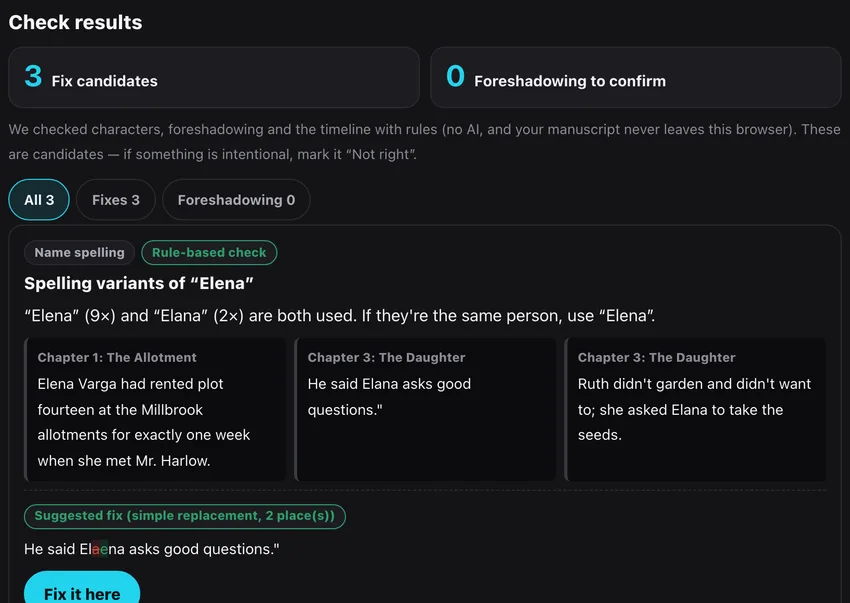
Writing with an AI tends to leave small cross-chapter slips: a character who is 17 in chapter 1 and 16 in chapter 4, a name spelled two ways. This guide shows how to put a Claude-written manuscript into BunCho's free importer, get a list of candidates in about five minutes, and fix them — with real screens.
Why AI-assisted drafts drift
Long drafts written with a chat assistant are usually produced in many sittings, and the model does not always keep every earlier chapter in view. Small facts drift: ages, eye colors, how a name is spelled, what a character already knows.
Reading the whole thing again to hunt for them is slow. It is faster to let a tool list the candidates first and then decide yourself.
The five-minute check
-
1Export your manuscript from Claude
Copy the text from the conversation, or save your compiled draft as Markdown (.md) or Word (.docx). Headings such as "Chapter 1" or "Prologue" on their own line split the text into chapters.
-
2Open the free importer
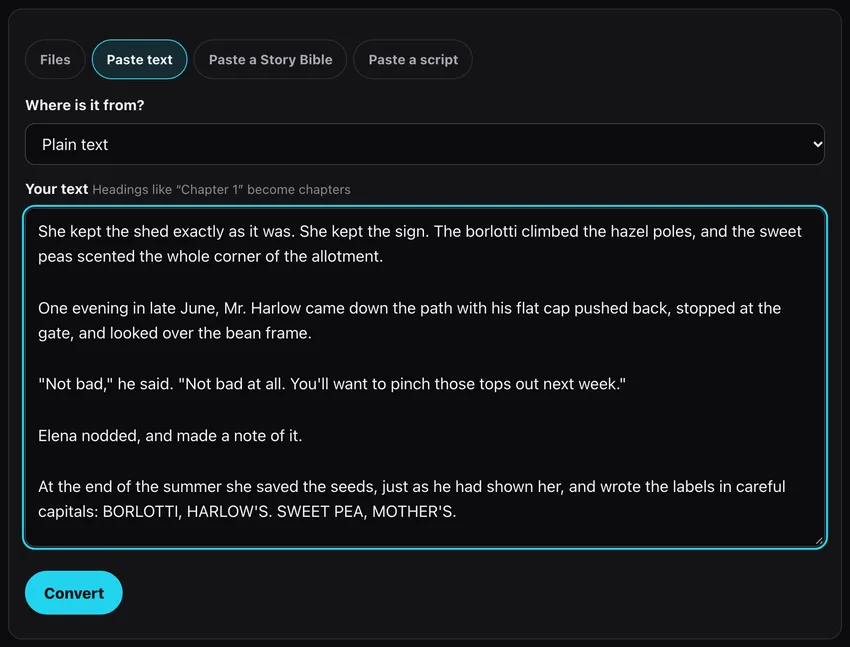
Go to bun-cho.work/en/import, drop the file or paste the text under "Paste text" and press Convert. No sign-up. Conversion and checks run inside your browser; the manuscript is not sent to our servers.
-
3Read the check results
After conversion you see the number of fix candidates and of foreshadowing to confirm, then one card per finding with the chapter and the original sentences side by side.
-
4Use "Fix it here" for simple replacements
Ages, colors and name spellings come with a red/green diff. "Fix it here" applies it to your manuscript (Undo is available), and the backup ZIP and Markdown download include the fix.

-
5Dismiss what is intentional
Dyed hair, an alias, a deliberate time jump: press "Not right" and the card goes away. "Helpful" / "Not right" improve the checks (only the kind of finding is sent, never your text).
-
6Rewrites go to the Studio
A character who reappears after leaving, or a line that knows a secret too early, needs rewriting. "Save and fix in the Studio" saves the work after login and opens Story Refactoring with the findings. "Fix this" puts a finding into the request; you review the affected chapters and accept only the AI diffs you want.

What the checks look for
All checks are rules; no AI is involved. English manuscripts get these:
| Check | What it flags |
|---|---|
| Age | A character's stated age changes with no time passing, or stays the same after "three years later" |
| Appearance | Hair or eye color changes with no dye, disguise or magic explained |
| Name spelling | One-letter variants such as Elena / Elana used a minority of the time |
| Character who left | Someone who passed away or moved away appears in a present scene (memories, dreams and calls excluded) |
| Knows too early | A line in chapter 2 already knows what the character only learns in chapter 5 |
| Foreshadowing | A pointedly introduced object (an old key, a sealed letter) never appears again |
| Timeline | Dates going backwards, "the next morning" with a season jump, a weekday that doesn't match the date |
How accurate is it?
We had a separate writer, who never saw the rules, write test manuscripts with planted problems plus clean controls. On the held-out set (not used for tuning), 87.5% of the findings were real problems (precision) and the checker found 35% of the planted problems (recall). Clean manuscripts produced no findings at all.
So what it flags is usually right, but it misses a lot. Treat it as a first pass, not a replacement for an editor.
After the check
Saved in the Studio, the manuscript can be continued, turned into a four-panel strip, a manga page or a vertical video, and setting changes can be applied across chapters with Story Refactoring.
Claude is a service of Anthropic. BunCho is not affiliated with Anthropic; this guide only describes how to finish a draft written with it.
See also: Turn your novel into manga / Turn a ChatGPT character into manga
FAQ
Is it free? Do I need an account?
Importing, checking and in-browser replacements are free and need no account. Logging in is only needed to save to the Studio and rewrite with AI (first-timers get 7 days free).
Is my manuscript uploaded?
Not while you convert and check: it all runs in your browser. It is sent only when you choose Save and fix in the Studio.
Does it work for drafts from ChatGPT or other tools?
Yes. Any Word, Google Docs, Markdown, Scrivener or plain-text manuscript can be imported.
Pages we checked for this guide
- BunCho free importer with continuity checks bun-cho.work · primary source
Features, prices and screens are as of October 13, 2026 and may change. Images are actual BunCho screens (some show the Japanese interface) and samples made in the Studio. Japanese original