BunCho video tools
Recast characters, motion and voice with your own cast
Use a saved character from your BunCho Studio Character Library (Soul ID) or 1–16 reference images to swap faces, replace full-body characters and outfits while keeping original camera and lighting, swap props, or convert speech timbre with lip-sync. Copyright-clean Trends presets need zero video uploads and zero prompts.
Open the video tools Plans and pricing
Available on paid plans with an active subscription (not on the free plan). You see a DREAM estimate before anything is generated.
If you are not signed in, you sign in (or create an account) first and then land on the video tools.
- Face Swap (Image)
- Face Swap (Video)
- Wan2.2-Animate-14B (Recast 480p)
- Seedance 2.0 R2V (Recast 720p)
- Kling 3.0 Pro V2V (Recast 1080p)
- Speech-to-Speech + LatentSync 1.6
A sample we made
This is real output from this tool in BunCho Studio. On the left is what went in; on the right is the video that came out.
You provide
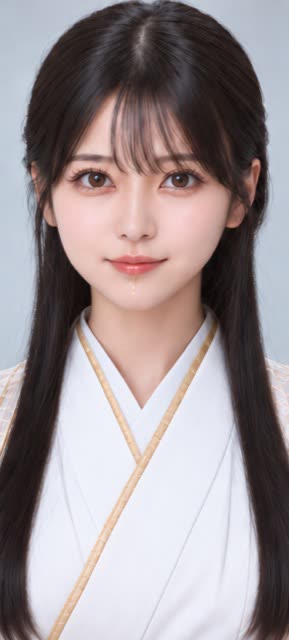
Result · Made with Wan2.2-Animate-14B / Kling 3.0 Pro
The people and characters in the samples are images made with BunCho, not real people.
What you put in, what you get
You provide
- My Character (Soul ID from Studio Character Library in 1 tap) or 1–16 reference images
- Source video (4–30 s) or image (no upload needed when choosing a Trends Recreate preset)
- Optional Voice + Lip-Sync toggle (14 character voice archetypes or consented voice sample)
- Mandatory rights ownership & explicit subject consent confirmation
You get
Recast image (PNG) or video (MP4 with synthetic-media provenance metadata, exportable for YouTube Shorts, Instagram Reels, and Threads).
Good for
- Recreate parody keynote, drama, or dance presets in 1 tap with your novel or manga character
- Try still-image face swaps using the daily free quota (up to 5/day for 0 DREAM)
- Replace a full-body actor and outfit in a 4–30 s clip you filmed yourself while keeping motion and lighting
- Convert speech into a character voice while keeping original pacing and re-syncing mouth movement
Models you can choose and their DREAM
Image face swap is 0 DREAM up to 5 times per day. Video modes unlock with the starter pack or any paid plan: video face swap is 20 DREAM, full-body Recast is 35 DREAM at 480p (Wan2.2-Animate-14B), 100 DREAM at 720p (Seedance 2.0), and 145 DREAM at 1080p (Kling 3.0 Pro). Voice + Lip-Sync is 35 DREAM.
| Model | Length | Approx. DREAM | Difference |
|---|---|---|---|
| Face Swap (Image)Default | 1 image | 0 (up to 5/day free on free plan; 5 thereafter) | Up to 5 free image swaps/day (0 DREAM) on free plan; 5 DREAM after daily quota |
| Face Swap (Video) | 1–30 s | 20 (up to 15 s) | Video face swap; unlocked via starter pack or paid plans |
| Wan2.2-Animate-14B (Recast 480p) | 4–30 s | 35 (up to 15 s) | 480p full-body character, outfit & expression replacement or object swap |
| Seedance 2.0 R2V (Recast 720p) | 4–30 s | 100 (up to 15 s) | 720p multi-reference character & lighting preservation |
| Kling 3.0 Pro V2V (Recast 1080p) | 4–30 s | 145 (up to 15 s) | 1080p full-body motion transfer & target object swap |
| Speech-to-Speech + LatentSync 1.6 | 1–30 s | 35 (up to 15 s) | Speech-to-speech timbre conversion (14 voice archetypes or consented sample) + lip-sync |
The estimate screen lists the DREAM for every model with the same input, so you can compare first and only generate when you agree.
How to use AI Recast & Face Swap
Pick your character (Soul ID)
Open Recast in Studio and pick a saved or official character in 1 tap, or register 1–16 reference images.
Choose a Trends preset or upload media
Select a copyright-clean Trends Recreate card with zero upload needed, or upload your own image or 4–30 s video.
Select resolution, voice and consent
Pick 480p, 720p, or 1080p, optionally add Voice + Lip-Sync, review the exact DREAM cost, and confirm rights and consent.
Generate and export
Start generation. Any job stopped by safety checks charges 0 DREAM (automatic refund). Export for YouTube Shorts, Instagram Reels, or Threads.
What you can do for free before subscribing
Making videos with these tools needs an active paid plan (not on the free plan). Before that, these are free:
Check the DREAM estimate
The table on this page shows the estimated DREAM per model and length. When you make one, no DREAM is used until you accept the estimate.
See the tableWrite the script and the motion notes
Write the lines to be spoken and the motion notes with the free plan's text AI (200 DREAM a month, no card) or the no-sign-up trial (3 a day).
Write from one line, no sign-upWatch the samples
Compare the inputs (image, audio, video) with the finished video in the samples on this page.
See the samplesMaking or exporting a video needs an active paid plan.
Other video tools
AI avatar
Make a video of a person talking from one image plus a script or audio file.
5 models · from about 126 DREAM for 5 s (P-Video Avatar)
Sample made with BunCho · Made with Kling Avatar 2.0 Pro
Motion control
Copy the movement of a person in a reference video onto the character in your image.
3 models · from about 151 DREAM for 5 s (P-Video Animate)
Sample made with BunCho · Made with Kling 3.0 Pro Motion Control
Lip sync
Redraw the mouth in a video of someone talking so it matches new audio or lines.
5 models · from about 46 DREAM for 5 s (Kling Lip-Sync)
Sample made with BunCho · Made with sync-3
Start & end frame
Make a video that moves from a first image to a last image, following your text.
6 models · from about 352 DREAM for 5 s (Kling 2.6 Pro)
Sample made with BunCho · Made with Kling 3.0 Pro
Extend a video
Continue a video from its last frame and add the new part to the end.
3 models · from about 805 DREAM for 5 s (LTX-2.3)
Sample made with BunCho · Made with Veo 3.1 Fast
AI Recast & Face Swap
Swap faces in images or videos, replace full-body characters and props while keeping motion, and convert voice with lip-sync.
6 models · 0 DREAM image swap (5/day free) · video from 20 DREAM
Plans and DREAM
- Available on paid plans (Watering, Seed, Feast, Full Course, Team & Business) with an active subscription. Not available on the free plan.
- The tools use your studio's monthly DREAM — the same balance you use for novels, manga and video.
- Before generating, you see a DREAM estimate for the model and length you picked. Nothing is generated until you agree.
- No DREAM is used if a job fails or if you cancel it before it starts.
Rights and AI disclosure
- Only use images, audio and video that you own or have permission to use. Real people's faces and voices may only be used with that person's permission.
- Do not use the tools to impersonate someone or to make a person appear to say something they did not say.
- The results are AI-generated. When you publish them, label them as AI-generated or AI-edited according to the rules of the platform you post on.
- Model names are listed because you can choose them in the product. Listing them does not imply any partnership with or endorsement by their makers.
FAQ
Can I try it on the free plan?
Yes. Image face swap includes up to 5 free generations per day (0 DREAM) on the free plan. Video face swap, full-body Recast, and voice conversion unlock via the starter pack or any paid subscription.
Can I use faces or voices of celebrities or politicians?
No. Using unconsented third parties, real celebrities, or politicians, minor likenesses, or non-consensual sexual content is strictly prohibited and blocked automatically. Use our copyright-clean parody presets with your own characters instead.
Are DREAM deducted if a safety check blocks a job?
No. Whether blocked before or after generation, held or charged credits are released or refunded immediately so net cost is 0 DREAM.
How can rights holders report unauthorized use?
Anyone can submit a takedown request without logging in via /studio/recast/report. High-severity reports automatically hide the output right away.
How many DREAM does each mode use?
Image face swap is 0 DREAM up to 5/day (5 DREAM thereafter), video face swap is 20 DREAM, full-body Recast is 35 DREAM (480p), 100 DREAM (720p), or 145 DREAM (1080p), and Voice + Lip-Sync is 35 DREAM.
Related
Make it with the studio's video tools
Available on paid plans with an active subscription (not on the free plan). You see a DREAM estimate before anything is generated.