AI novel writing
Write your novel with AI
BunCho isn’t for having AI write the whole book; it helps you write yours. Talk through plot turns, rewrite phrasing, get suggestions for what comes next, and restructure several chapters at once. Every AI change is shown before and after, so the manuscript stays in your hands.
Open the writing StudioHow it works
The writing editor is on the Free plan (no card needed), with 300 credits a month to try AI generation. Paid plans start with a 7-day free trial.

Why write with BunCho
The AI doesn’t rewrite on its own
Whether from the instruction box or ⌘K / Ctrl+K, changes appear as diffs first. Your text stays the same until you press accept, and a checkpoint is saved automatically before you do.
Long books stay consistent
Set a character sheet (voice, looks, relationships), a world memo and writing rules (point of view, style, banned words) per work, and they go into every instruction.
A plan and an estimate before big changes
For edits across several chapters, you see which sections will change and how many credits it will take before anything runs.
Tab completion
When you stop typing, the next one to three sentences appear in faint text. Tab accepts them, Esc dismisses them.
Bring your manuscript
Import TXT, Markdown, DOCX, EPUB or Scrivener (ZIP) files up to 2 MB as drafts, after checking the chapter and section preview.
From novel to manga and video
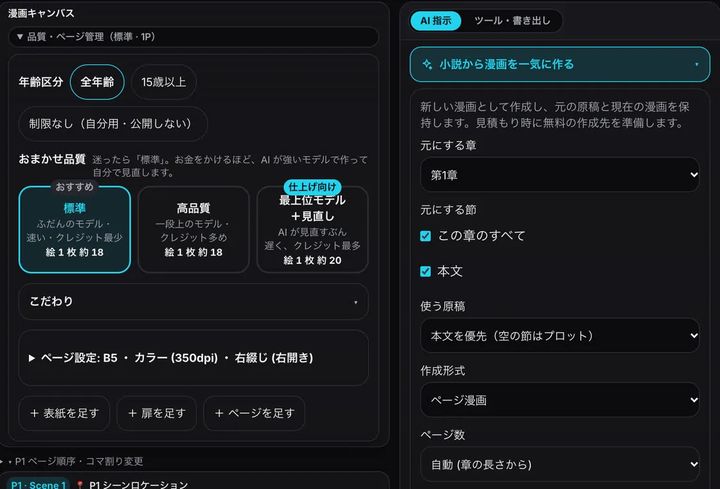
Make thumbnails (name) from a chapter and edit them next to the text, or make a comic or a video draft from it. The original manuscript stays as it is.
Writing a novel with AI, step by step
You write; the AI helps with planning, rewriting, continuing and checking. The screenshots show the Japanese version of the Studio.
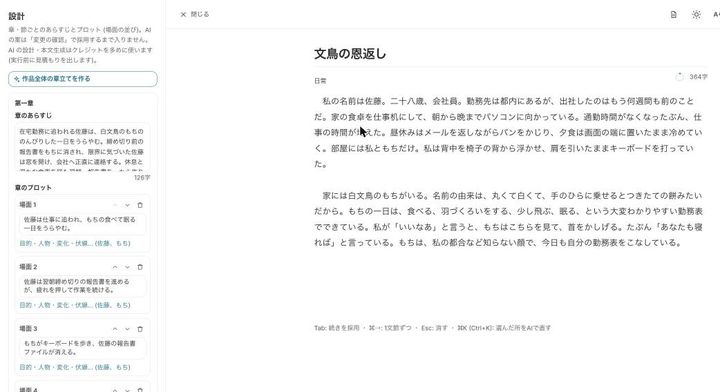
Plan chapters and the plot
Build the chapter outline, per-chapter summaries and the plot in the Studio’s planning view. Results appear as proposed changes, and only what you accept goes into the manuscript.
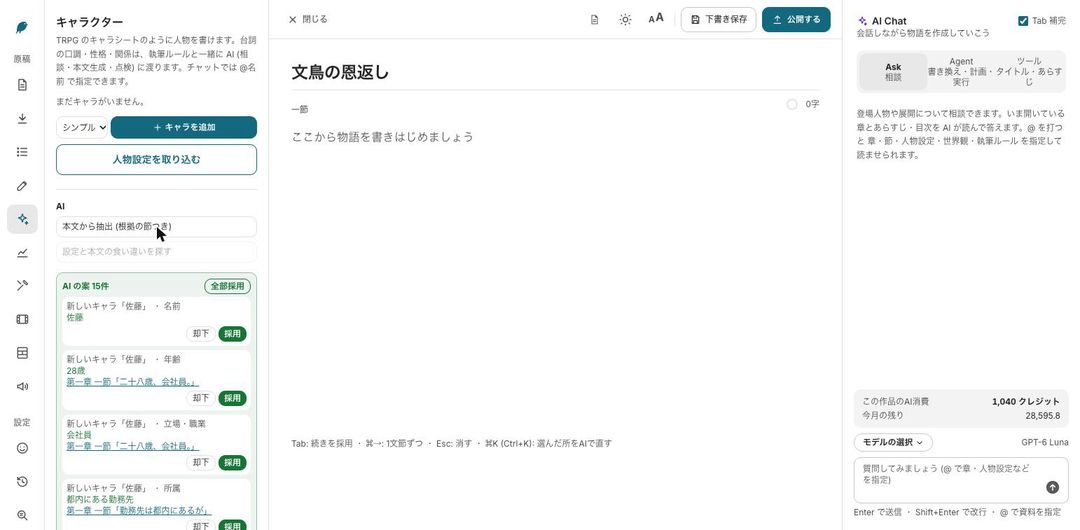
Set up characters and rules
Fill in the character sheet (voice, looks, relationships), a world memo and writing rules (point of view, style, banned words) for the work. They are included in every instruction you give the AI.
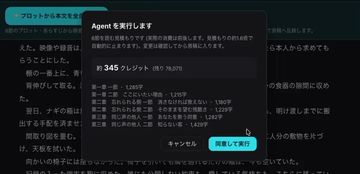
Write, then rewrite with instructions
When you stall, the next one to three sentences appear in faint text; Tab accepts them. Select a passage and press ⌘K / Ctrl+K to rewrite it. For changes across chapters, write one line in the AI instruction box: you see a plan and a credit estimate first, and nothing runs until you agree.
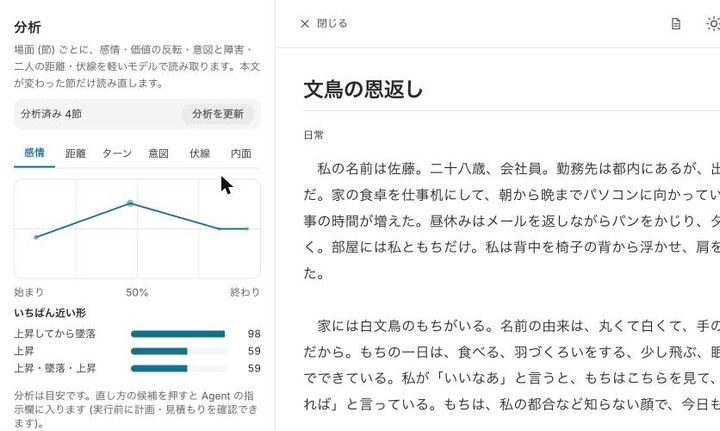
Check the pacing
The analysis view draws an emotion curve of the story and shows the closest arc shape, so you can spot flat stretches. Rule-based story checks use no credits.
Export, or turn it into manga or video
Save as DOCX, EPUB (with ruby), TXT or Markdown. From the same editor you can make thumbnails, a comic or a video draft from a chapter; your manuscript stays as it is.


Examples of instructions
Select text and write what you want in plain words.
| Instruction | What happens |
|---|---|
| Make it more atmospheric | The selected passage is rewritten with more mood and shown as a diff |
| Add more dialogue | Lines of dialogue are added to the scene |
| Rewrite in third person | The passage is rewritten from a third-person point of view |
| Add one piece of foreshadowing | A hint is planted that can pay off later |
| Tighten the pacing | Sentences are shortened and the scene moves faster |
| Make Lise speak formally in chapters 2–4 | A plan lists the sections across chapters, with an estimate, before it runs |
What’s free and what uses credits
- The writing editor, saving, character management and basic revision are on the Free plan, with no card needed. The Free plan includes 300 credits a month for AI generation.
- Larger AI work (rewrites across chapters, analysis with AI) shows an estimate first and runs only after you agree.
- To keep making manga and video, paid plans start with a 7-day free trial (a card is registered when you sign up).
How the AI works with your manuscript
- The AI never changes your text on its own: every change is shown as a diff and applied only when you accept it. A checkpoint is saved before you accept.
- BunCho does not use your works, prompts or outputs to train or fine-tune AI models.
- Publishing sites and contests have their own rules about AI-assisted work, and they change. Check their current guidelines before you post.
FAQ
Can I write a novel with AI for free?
The writing editor, saving, character management and basic revision are on the Free plan with no card needed, and the Free plan includes 300 credits a month to try AI generation. Paid plans for manga and video start with a 7-day free trial.
Will the AI change my manuscript without asking?
No. Every change appears as a before-and-after diff, and your text changes only when you press accept.
Can I bring the manuscript I’m working on?
Yes. TXT, Markdown, DOCX, EPUB and Scrivener (ZIP) files up to 2 MB can be imported as drafts after you check the chapter and section preview. The original files stay as they are.
Can I write on my phone?
Yes. It runs in the browser, so there’s nothing to install. On a phone, use “rewrite with AI” from the selection menu and the “accept continuation” button for completions.
Can I post AI-assisted novels on publishing sites?
Rules about AI-assisted work (for example, labeling) differ by site and change over time. Check each site’s current guidelines before you post.
Write your novel with AI as a co-writer
Plans, rewrites and continuations come as proposals you review first. The manuscript stays yours.
Open the writing StudioSee plans and pricing
The writing editor is on the Free plan (no card needed), with 300 credits a month to try AI generation. Paid plans start with a 7-day free trial.