AI manga & comics
Make manga and comics with AI
If you have a story or an idea, you can turn it into a comic even if you don’t draw. BunCho Studio takes you from script to thumbnails, art and speech balloons on one screen, and you redraw only the panels you don’t like. Writers can turn a chapter or a favorite scene straight into manga.
Make it in the StudioSee the samples
7-day free trial (1,000 credits on any plan). You always see an estimate before anything is made, and no credits are used until you agree.

Comics made in the Studio
Samples made with BunCho Studio and its templates: 4-panel comics, page manga and vertical-scroll webtoons.


All are fictional works made with AI; the characters do not exist. The dialogue is in Japanese.
What BunCho gives you for comics
Three formats
4-panel comics for social media (vertical, 2×2 and horizontal), page manga for doujinshi and submissions (spreads, page numbers, bleed), and full-color vertical-scroll webtoons.
The same character every time
Lock a character sheet and every panel is drawn from it, so faces, hair and outfits stay consistent. A panel that drifts can be redrawn on its own. Expression sets are made in one go.
From your novel
Pick a chapter and section of your novel and the format, check the estimate, and make the comic. The manga is created as a new work and your manuscript stays as it is. You can also make only the thumbnails first.
Episode 2, 3 and on
“Continue (episode N)” carries over characters (looks, locked faces, voices), art style, world rules and story state (foreshadowing, relationships, injuries, belongings) to the next episode.
Export for posting and print
A single image for social media, TIFF (600 dpi) and PDF with crop marks for print, layered PSD with the text kept editable, and webtoon slices up to 800 px wide and 1,280 px per image.
Voice comics
Add voices and motion to a finished comic and turn it into a vertical or horizontal video.
How a 4-panel comic comes together
From a one-line idea through script, thumbnails (name), art and speech balloons. The screenshots show the Japanese version of the Studio.
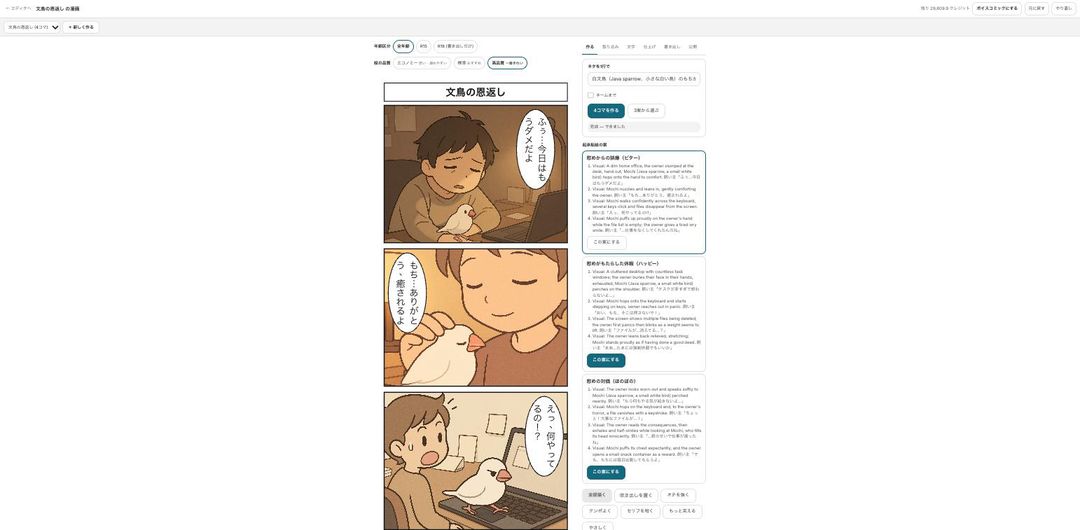
Write the idea in one line
Open “Make a 4-panel comic”, write your idea in a line and pick the lead character. You get setup–development–twist–punchline options and choose the punchline you like. You can try the idea and style steps without signing in.
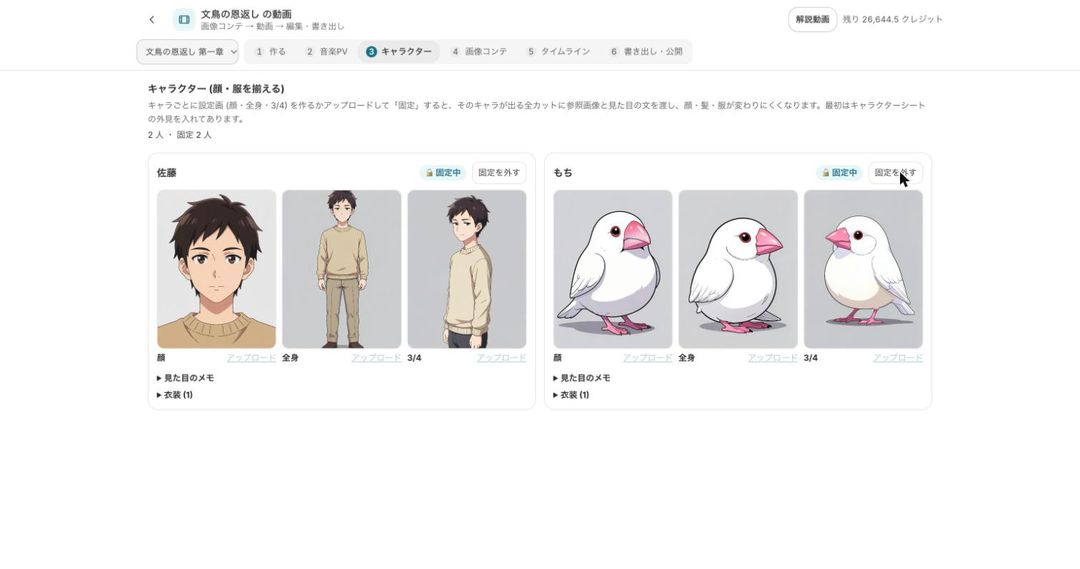
Make and lock character sheets
Create face and full-body sheets and lock them, and every panel is drawn from those sheets, so faces, hair and outfits stay consistent. You can also make an expression set (joy, anger, sadness, fun, surprise, embarrassment, neutral) in one go.
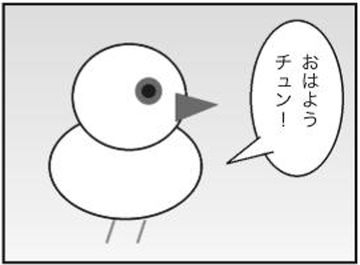
Finish with balloons, sound effects and effects
Dialogue goes into speech balloons. Sound effects and effects such as speed lines are placed automatically away from faces (you can turn this off and edit each one, at no extra credit cost). Ruby text and screen tones are available too.
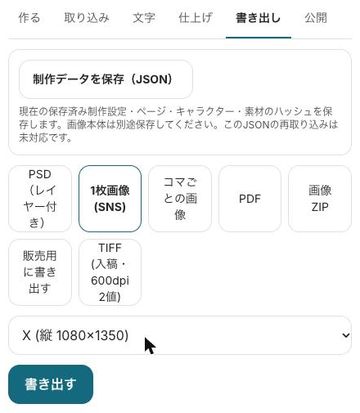
Export and post
Export a single image for social media, one image per panel, PDF, TIFF, PSD, an image ZIP or webtoon slices. Exporting uses no credits (only the AI 2× upscale does).


Which format to choose
The comic formats in BunCho Studio and what each is for.
| Format | Good for | Export |
|---|---|---|
| 4-panel comic | Social media posts, recurring characters | Single image for social media (X, Instagram sizes), per-panel images for carousels |
| Page manga | Doujinshi, contest submissions, one-shots | PDF with crop marks and bleed, TIFF (600 dpi, 1-bit), layered PSD |
| Webtoon (vertical scroll) | Phone readers, webtoon platforms | Slices up to 800 px wide and 1,280 px per image |
| Voice comic | Turning a finished comic into a short video | Vertical 9:16 or horizontal video |
Pricing and what you can try for free
- The Studio is used on a paid plan. New users get a 7-day free trial with 1,000 credits on any plan.
- Credits depend on the number of panels, the art quality and any redraws. You always see an estimate first, and nothing is used until you agree.
- To see a result before subscribing, the trial 4-panel comic is free once a day per account.
- Exporting and the automatic placement of sound effects and effects use no credits.
Rules for AI-made comics
- The art is drawn by AI. When you publish, make it clear that the work was made with AI.
- You cannot use real people or characters from other people’s works. Use your own characters or official ones such as Mochi the Java sparrow.
- Whether a contest or platform accepts AI-assisted work differs from place to place. Check each one’s current rules before you submit.
FAQ
Can I make manga if I can’t draw?
Yes. From an idea or a script, the Studio takes you through thumbnails, art and balloons. If you have hand-drawn pages, you can import layered PSD files and mix them with AI panels.
Can the same character look the same every time?
Lock a character sheet and every panel is drawn from it, so faces, hair and outfits stay consistent. A quality check compares faces in the panels with the sheet and flags the ones that differ; you can redraw just those panels.
Can I choose art quality and how credits are used?
Yes, art quality can be chosen per work. For example, try thumbnails at a lower quality and use a higher one only for the finish. You always see an estimate first.
Can I turn my novel into a comic?
Yes. Choose the chapter and section, the format and the number of pages, check the estimate, and make it. The comic is a new work and your manuscript is unchanged.
Can I submit AI comics to contests or webtoon platforms?
Exports cover TIFF, PDF with crop marks and webtoon slices. Whether AI-assisted work is accepted differs by contest and platform, so check their current rules before you submit.
Start from a one-line idea
Script, thumbnails, art and balloons on one screen, and you redraw only the panels you don’t like.
Make it in the StudioSee plans and pricing
7-day free trial (1,000 credits on any plan). You always see an estimate before anything is made, and no credits are used until you agree.