Vertical short drama × AI
Vertical drama production, with your team in one place
Keep characters, facts, foreshadowing and timeline as one canon per work, and build scripts, storyboards, video and subtitles from it. When you change a fact, BunCho finds the scenes that need to change and shows the edits as diffs.
Start from the templateTalk to us (teams)
7-day free trial (1,000 credits on any plan; video limited to one work and 30 seconds in total). Opening a template and editing dialogue use no credits.
Built around a production workflow
One canon per work
Characters, facts, foreshadowing and timeline live in the work’s canon. Change a fact and you get the affected scenes and proposed edits as diffs, which you accept or reject one by one.
Bring the scripts you already have
Import manuscripts and scripts from Word, Scrivener, Markdown, Fountain, FDX and more. You can try the importer without signing in.
Same faces across episodes
Locked character sheets can be copied to other videos in the same work for free, so episode two onward keeps the same faces and outfits.
Hand off to your editing software
Exports are 9:16, 1080p MP4 files with SRT subtitles. The timeline can also be exported as XML for finishing in other editing software.
Team admin and paperwork
The Team plan lets you manage members and works from an admin screen. Generate a quote (PDF) on the spot and apply for invoice payment. SSO, SCIM and IP allow-lists are available on Enterprise.
Two-week pilot
Try BunCho’s production workflow on one real work (or a few episodes) for two weeks. Scope and price are agreed with you.
Vertical short dramas on our official channel
Vertical short dramas made with AI by the BunCho production team and published on our official YouTube channel. 60–75 seconds per episode, 9:16, with subtitles.


All are fictional stories made with AI; the characters do not exist. Audio and subtitles are in Japanese.
How one episode comes together
From opening the template to exporting a 9:16 MP4. The screenshots show the Japanese version of the Studio.
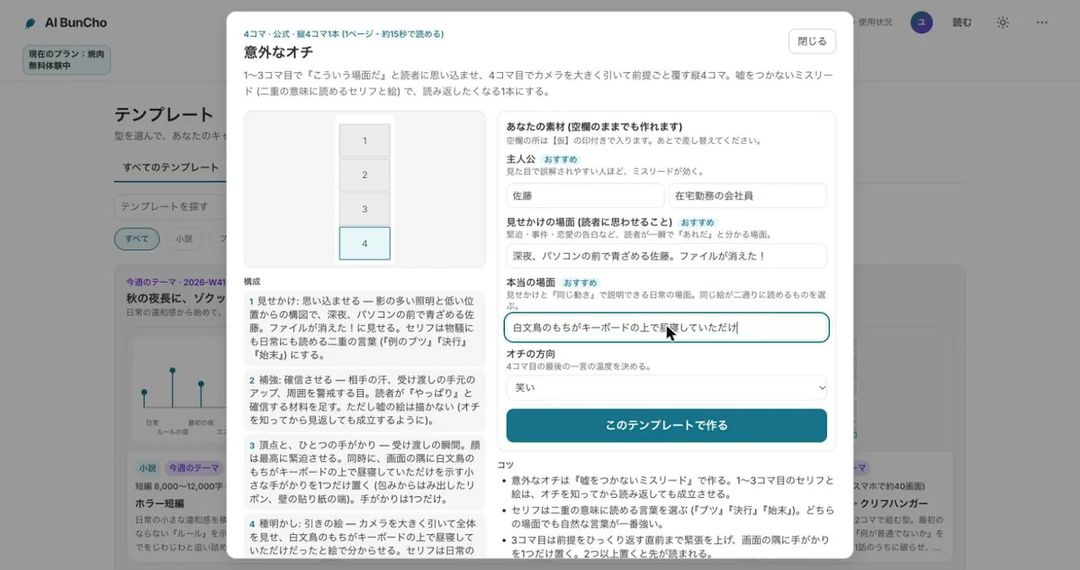
Open the template and add your material
Open “Vertical short drama, 1 episode / 1 minute”, enter the lead, the other character, what the ending almost reveals and the episode number, then create the project. You get a 9:16 project with a 15-shot breakdown and dialogue slots. No images are made yet, so no credits are used.
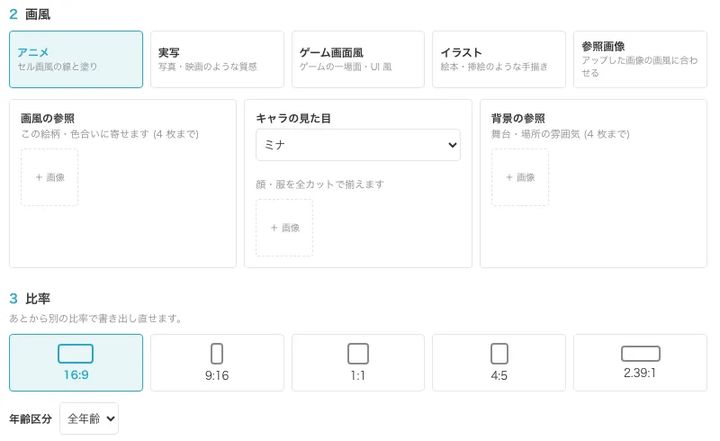
Pick the style, aspect ratio and video quality
Styles: anime, live-action, game screen, illustration or your reference image. Ratios: 9:16, 16:9, 1:1, 4:5 or 2.39:1. Video quality has five levels, so you choose between speed and credits. Starting from your own script, you pick a chapter and build the storyboard from it.
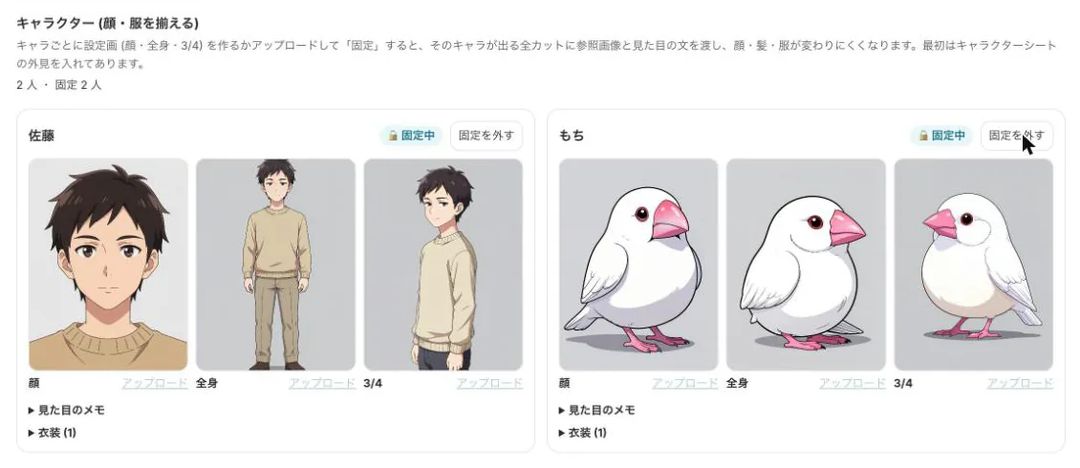
Make character sheets and lock them
Create face, full-body and three-quarter sheets, then lock them. Every shot with that character receives the sheets and the appearance notes. Shots where the face or outfit drifts from the sheet are flagged for review.
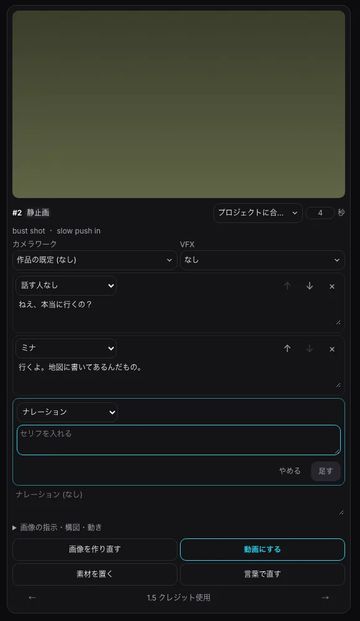
Rewrite the lines and fix images in words
On each storyboard card you edit the dialogue, the speaker, the camera move and the VFX. Editing dialogue costs no credits. To change an image, describe the fix in words, such as “make it the moment the papers hit the floor”.
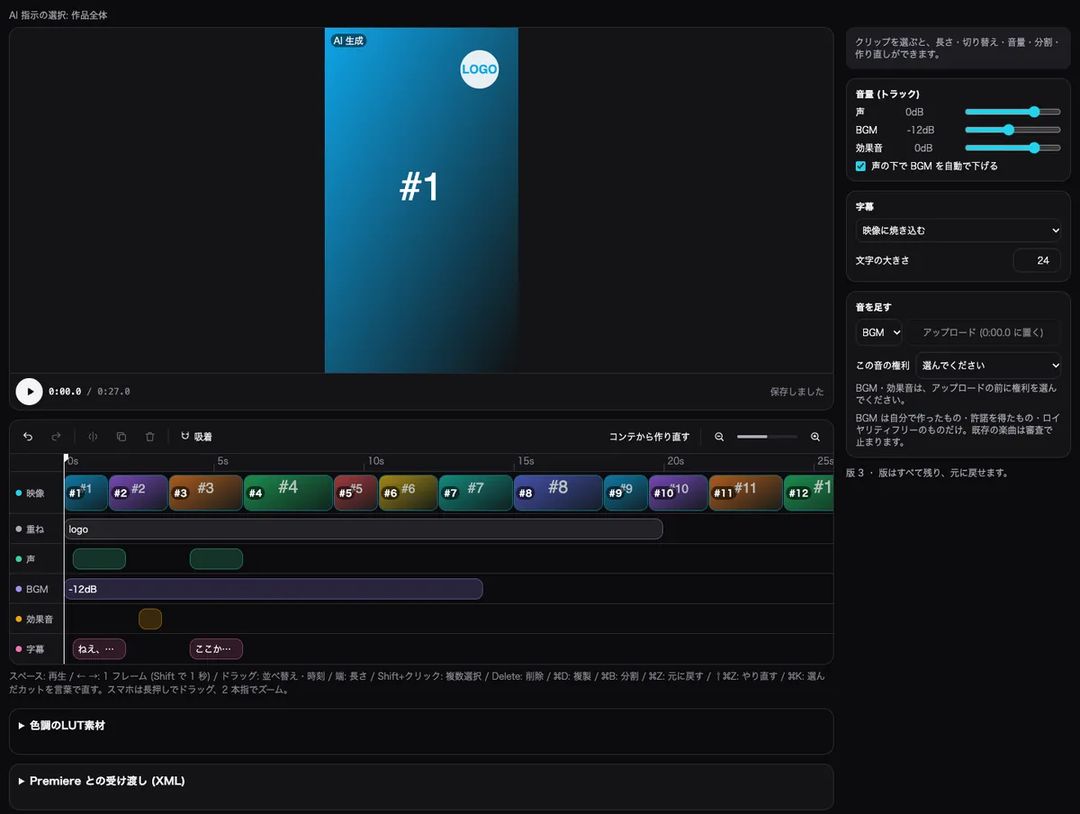
Choose the shots to animate; add voice, music and subtitles
You can turn only the key shots into AI video and show the rest as stills with a slow push-in. Building the timeline from the storyboard lays out video, voice, music, sound effects and subtitles on separate tracks, and the music can duck automatically under the voice.
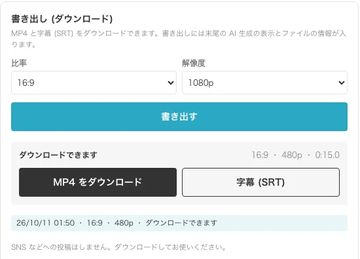
Check for mismatches and export in 9:16
Before exporting you can check for mismatches in faces, outfits, number of people, on-screen text, voices, subtitles and lines, at no credit cost. Download a 9:16, 1080p MP4 and an SRT subtitle file; an AI-generated notice is added at the end of the video.


What BunCho covers at each stage
Common stages of vertical drama production and what the Studio does for each.
| Stage | In BunCho Studio |
|---|---|
| Development and script | A 60-second, 15-shot episode template, a series sheet, and export to Japanese script format, Fountain and FDX |
| Storyboard | An image storyboard built from a script chapter into scenes and shots (lines, narration, framing, motion); fix images in words |
| Characters | Face, full-body and 3/4 sheets locked and passed to every shot; drifting shots are flagged |
| Footage | AI video only for key shots; 40 camera moves, 18 VFX and five video-quality levels |
| Voice, sound and subtitles | Voices for lines, music and sound effects (with a rights declaration), burned-in subtitles and SRT |
| Review and export | Pre-export mismatch check, 9:16 1080p MP4, SRT and XML hand-off |
| Team | Member and work management, quotes (PDF), invoice payment, and SSO, SCIM and IP allow-lists on Enterprise |
Pricing and free trial
- The Studio is used on a paid plan. New users get a 7-day free trial with 1,000 credits on any plan (video limited to one work and 30 seconds in total).
- AI video credits depend on the number of seconds and the video quality. You see an estimate before anything is generated, and large amounts ask for your confirmation.
- Opening a template, editing dialogue, building the timeline and the pre-export mismatch check use no credits.
Rules for AI-made video
- Footage, voices and images are made with AI. An AI-generated notice is added to the end of every exported video.
- You cannot use real people’s faces, names or voices, or characters from other people’s works. Your characters must be your own.
- Music must be your own, licensed or royalty-free. Existing commercial songs are stopped at the export review.
- Exports go through a review, and content resembling real people or existing works may be stopped. You can fix the flagged shots and export again.
FAQ
Are our manuscripts and scripts used to train AI?
BunCho does not use your works, prompts or outputs to train or fine-tune AI models. Content sent to external AI providers to produce results is handled under their API terms.
How much is the pilot?
It depends on the size of the work and the stages you want to try, so it is agreed with you. Contact us from the teams page.
Can we pay by invoice?
On the Team plan you can generate a quote (PDF) on the spot and apply for invoice payment.
Can we finish in the editing software we already use?
Besides MP4 and SRT, the timeline can be exported as XML, so you can hand it off to other editing software.
Can we make footage that looks like a real actor?
No. Real people’s faces, names and voices cannot be used, and such content may be stopped at the export review. Characters must be original.
Start from the 60-second episode template
Fifteen shots that open in the middle of the incident and cut just before the answer. Check the flow on the storyboard, then animate only the shots you choose.
Start from the templateSee plans and pricing
7-day free trial (1,000 credits on any plan; video limited to one work and 30 seconds in total). Opening a template and editing dialogue use no credits.